
This month, I decided to take a small challenge and try something new for my coding process by using NeoVim. The trigger was performance: I had several Cursor windows open, managing different projects with git worktrees, and my computer started crawling. Memory consumption was spiking way beyond other apps. So I started looking for alternatives.
I tried Zed, as some coworkers suggested, but a deeper thought came to mind: here I am, learning a new IDE, again. Over the years, I’ve gone through Notepad++, Brackets, Atom, Sublime, VSCode, and finally Cursor. Each time, I spent weeks customizing themes, memorizing shortcuts, and testing extensions until I had a workflow I was happy with. VSCode was the tool I spent the most time with and customized the most. Then I discovered Cursor a couple of years ago when a customer shared their screen to show some code changes, and I got curious about this new world of agentic development environments. I could import my VSCode customizations, and it felt like a natural next step. But in the last six months, the same old problem came back, Cursor became resource-heavy, and having multiple windows open alongside other applications made it a pain to work with.
When I mentioned this to coworkers, they suggested Vim, more specifically NeoVim. I could customize as much as I wanted, manage multiple projects with tmux sessions, and it would be lightweight. More importantly, it felt like a tool I wouldn’t need to replace every 2 to 5 years. The only catch is that the learning curve can be quite long (and I’m still in it!). All my career has been using an IDE and mostly interacting with the mouse, so I thought it would be interesting to try something new. I’m still learning and improving my workflow, but I wanted to write about my experience and invite others to consider a similar journey.
Use Cases
I don’t like to learn a new tool just for the sake of it. I enjoy thinking about specific use cases and whether it makes sense for me or for my future self, who can take advantage of it someday. Here are some of the things that worked for me that may be different for you, but can help you decide if NeoVim is the right tool for your process.
And, to be fair, I believe that some use cases below are more related to my work with the terminal and less about NeoVim. But I feel they are still relevant to share here. The use cases:
- Run with multiple applications, commands, in a convenient way: When working inside the terminal, it is so much easier to open one (or even multiple) windows/buffers/tabs and manage several files/containers and other details. All this with some commands on the keyboard. Some additional information here:
- My usual workflow is to create a tmux session and have, usually, four main windows: NeoVim (which I heavily use tabs to manage), LazyGit (which I could use inside NeoVim, but I like this way), some AI instance like Claude code, and some way to run the application/tests.
- This also makes it easier to work in different branches and codebases. So much easier to detach from a session, go to another git worktree folder, or just go outside of NeoVim.
- I worked on multiple projects, and sometimes I would forget specific elements, so I had to go back to that project and remember details. I had this case where I was already using NeoVim, detaching a session, two weeks passed, got back, and attached to the “old” session. I saw everything organized, and it helped me “get back on track” quite easily. A simple touch that can be done probably with other IDEs, but it is something so easy to do inside the terminal with NeoVim.
- Work with limited resources: My experience working with Cursor versus the terminal (which I’m using Ghostty, as my emulator) is that Cursor can go up to 5x more memory consumption than the terminal. Zed is way more interesting on that front, but still can be 2x more than the terminal. This, considering all the helpers, renders, extensions, and so forth.
- I understand that this may be a bit of an unfair comparison, since some extensions and plugins exist in VSCode/Cursor that don’t deliver the same experience via the terminal. BUT, in my opinion, they are as good as the more UI driven options. For example, LazyGit is such a fantastic experience. I used to have GitLens on VSCode, I can have a “similar” experience with LazyGit (and even more productive because it is everything in my keyboard and I don’t have to go to the mouse to navigate the UI).
- Handle challenging coding environments: Last year, I had several cases where customers would provide a Windows machine or computer that I had to use and configure. And some of those environments could not only be problematic to work with because of permissions, but also not have many resources available. So, got used to using the terminal to go via SSH (when I could do that) or inside a Remote Desktop to work with it. In reality, if you have a common and consistent environment, you can install VSCode, configure it once, or share your configuration, maybe between your work and personal computer. But when you work in a place where you don’t know what the next environment/language/computer/access will be, being flexible and using the terminal is a great option.
- I understand this can be a hassle as well because you still will need to install some packages and libraries in those environments. Some applications cannot be accessed in some operating systems; if I’m not mistaken, tmux doesn’t work on Windows and so forth. I believe that simplification here is better. I had cases where the customer blocked the use of Cursor because the only approved options were VSCode, inside their enterprise. In this case, I just used basic Vim, and it was good enough.
- Explore more terminal applications: This is quite a personal thing, but I feel that interfaces today are more and more cluttered with information. Which makes sense because we keep adding features, and users won’t remember all the commands required to access that (or memorize new ones for specific features). I wanted to go back into the terminal and test new tools that I was excited to hear about. Common stuff like Claude Code and Codex, but also more interesting things like Yazi, Backlog.md, gh-dash, rainfrog, and others. All so I could run inside one place without leaving my terminal.
- And I know I could use an IDE, but I always felt a bad experience sharing the terminal (or multiple terminals/windows) in VSCode or similar.
After seeing some use cases or “features” that got me interested in changing my workflow a bit, I would like to share more on how I made the shift and started to include them in my daily routine.
My process
As I mentioned here, and some of you may know, NeoVim can have a steep learning curve. Combined with the fact that it has endless customization with so many different tools to use, I didn’t want to be trapped in this cycle to try to build the “perfect” setup and not have something useful later on. At the same time, I had some challenges adjusting to NeoVim (from basic stuff like forgetting which mode I was in to mixing v-block with visual mode itself and other details). I decided to do the steps below. Once I felt that it was good enough, I would move forward to the next step:
- Set up a simple terminal layout with Starship, and spend some time here trying to explore different designs/colors/fonts.
- Installed and configured Ghostty. I did some customization on the visual, but it is just an emulator for the terminal, and there was not a big learning curve there. Just installed and started to use it.
- Started to use tmux more heavily, where I would set up my own pattern and naming for the sessions and windows. Additionally, started memorizing the most common commands to improve my workflow.
- For NeoVim:
- Installed NvChad to make my life easier and to avoid configuring everything initially
- Installed some plugins like Diffview.nvim, lazygit.nvim, markview.nvim and menu.
- Put all the configuration in a private GitHub repo so I can reuse in different computers that I have.
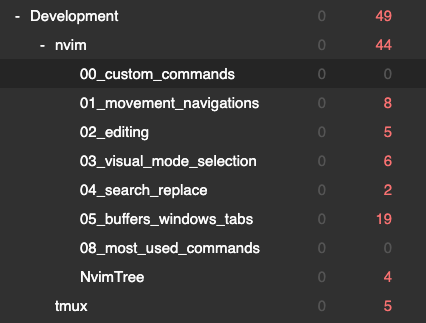
Every new step there, I would learn a bit more about each tool and how to customize it when I wanted to do something like that. Eventually, I did an Anki deck to memorize the main commands from the tools (and some that I configured myself):
Was it worth it?
For now, I must say that I’m still too early to say. I’m spending more time in this path (learning about the tools, searching for plugins, understanding a bit more of Lua, memorizing some keybindings, customizing some commands) than actually being productive. I feel that the real gain will appear over the years, when I can keep consistency instead of changing my IDE every 2 to 5 years, or when I have some other challenging projects, and I can manage them more easily later on.
Although I see that the biggest gains will be long-term, I see some improvements already:
- My workflow is quite smooth. I have already configured several keyboard commands related to music (and Spotify specifically), so I can increase/decrease volume, change music, search a specific playlist, but now I can include more my work in this process by open a new buffer/window, run an application, or stop a container, all with my keyboard without having to use my mouse to switch to projects/folders/files.
- I feel a lot more joy at my flow; it helped me to reduce moments of “boredom” because I keep thinking of ways to create a custom command or even a macro so I can improve my process. It helped me enter a more “zen mode” or clear state, where I can focus a bit more and enjoy it.
- I have a better “relationship” with my terminal, which helps me be more open to terminal applications and plugins. This alone helps open a whole world of possibilities/tools that are already great options for my workflow.
I feel that, with time, I will spend more time configuring my environment. Create my own theme, explore other distros, and options. I just want to create a healthy balance between optimizing my workflow and then using it to do the work. And this is what I recommend others do: if you feel happy in your current process, great! If you want to try something new, as it happened to me, try NeoVim and use your terminal more. Just remember to improve the process and do the thing, and avoid procrastination by always improving the process.
Next year, I plan to revisit this piece and go over my experience of NeoVim to show more meaningful improvements. It should be fun!