
Every time that I’m in a project starting a data lake or storing some information in a blob storage like S3, I start to think about a few basic things. Such as:
- What would be the format of the files
- The partition that is required to organize/improve performance when reading it
- What are the access patterns for the data. What frequency and main ways to consume it
- Naming of the files, specific patterns to follow
- Versioning of the files in the storage
And much more. Data engineers can spend hours debating those topics but one thing that I see less or not even being discussed deeply online is about data compression itself. Recently I was reading Choosing Between gzip, Brotli and zStandard compression from Paul Calvano and I decided to do a similar work he did but thinking on big data patterns instead of focusing on web consumption.
To be fair, I’m aware there is plenty of benchmarks for data compression in the market (for example, with Squash), but I want to be able to consider the following details:
- Control or give more details about the compute/memory (which may be not clear in specific benchmarks)
- To use Spark in the process, see details of the codec and check for more advance features (like splitting large parquet files)
- Evaluate different compression algoritims and levels based on a data lake purpose
Before diving into the benchmark itself, I want to spend briefly some time and introduce the data compression topics, allowing to explain the process now will make it easier to understand how to compare each algorithm/codec later.
Let’s dive into it!
Part 1: Intro do data compression
What is data compression
In a nutshell:
It is the process to reduce the size of the files by an algorithm. It will identify redundancies or patterns, which can help “compact” information more efficiently.
Each compression algorithm can be different (the way that details can vary, so the programming language and methods used), but the main idea is that they identify some redundancies of the data, to reduce that part and represent it in the least volume of data/bits as possible.
Each compression accounts for the following elements:
- Algorithm to be used: The main method used to compress/decompress the data. It can support different types (lossless, lossy), levels, programming languages and so forth.
- Compression Type: There are, basically, two ways to make the file smaller.
- Lossless: Rewrite the data to reduce size, then rebuild exactly as it was for consumption. Very common for text/code/executables.
- Lossy: Rewrite the data to reduce the size, but since humans will consume it, the quality can be lower since (usually) they don’t detect small differences and changes. Very common for content like photos/audio/video.
- Compression Level: Some algorithms has a way to determine on how “much” you want to compress, and thus reduce size (but there is always a catch/tradeoff).
- For lossless, this represents how much the encoder searches until it find an identical at every level. The main drawback here is CPU, where you will have more processing to conduct that activity (compressing and decompressing, which can cause the speed for each stage to vary).
- For lossy, it means how much detail you want to keep or how much quality will eliminate because of the file size.
- Splitability: Depending of the file type/format and algorithm, the compression can split the file without decompressing it first. This is useful for reading/processing large files.
When comparing algorithms, it is important to keep an eye in the following metrics:
- Compression Ratio: A comparison between the original file size and the new size after a compression. For example, if a file has 100 MB and, after a compression, it went to 50 MB, the ratio would be 100 / 50 = 2x.
- Compression Speed/Time: How fast is the data being written after the compression.
- Decompression Speed/Time: How fast is the data being read back to the computer.
How it works
The simple situation to explain how data compression works is basically to reduce redundancy. Let’s say you have a file that has the following text:
A A A A A A B B B B B B B B C C C C A A A A A A A A
As you can see, there is a lot of repetition there, right? Several As, Bs, Cs and then As. What if we could group them, to save space? For example, you can put like this:
6xA 8xB 4xC 8xA
And then, once you decompress it, you can put exactly as the original content and no loss happened (lossless) plus you saved some space.
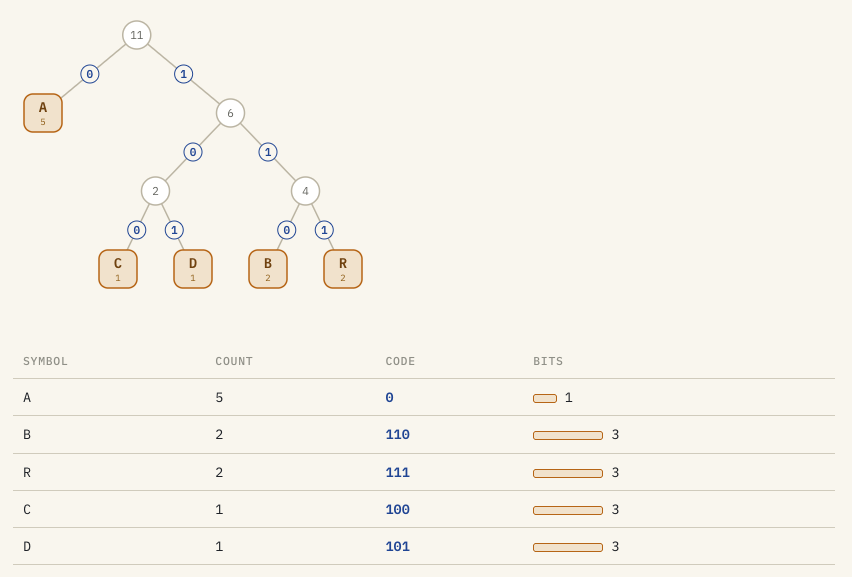
Now, other algorithms have more complex processes to save even more space. For example, Huffman coding builds a custom alphabet where the most frequent symbol get the shortest bit-string, rare ones get longer, so forth. This way, you can save even more space! If you use, for example in a word like:
ABRACADABRA:- Each word is 1 byte and lead to 8 bits each, so we have
88 bitsin total - But if you compress it in that method, you will have
23 bitsin totalAappears 5 times and has 1 bit each = Total of 5Bappears 2 times and has 3 bits each = Total of 6Rappears 2 times and has 3 bits each = Total of 6Cappears 1 times and has 3 bits each = Total of 3Dappears 1 times and has 3 bits each = Total of 3
- Compression ratio:
88 / 23 = 3.82x!
- Each word is 1 byte and lead to 8 bits each, so we have
Here is the breakdown of the method, in a diagram:
Why to (or not to) do it
Ideally, you want to use compression in a few scenarios, and that can bring in the following benefits:
- Save space: That is the most obvious benefit. When you compress, it is a process that you can basically “compact” so you can fit more with less. When you have, for example, 1 GB of a CSV file, after compression, it can go to half of that or even more (depending on the method, how the file is structured, and so forth).
- Save on cost: Since cloud providers, which are mostly the focus of this blog, charge you per use (how much you store, how much you write/read, and so forth). Having “less volume” of the same data can be a significant way to reduce your expenses in that front.
- This can also reference about the transfer of the data. For example, data transfer and egress costs or compressing data in a streaming pipeline to “take more with less”.
- Improve performance: Although the compression/decompression process trades a bit of CPU for a larger saving on cost, you would assume this could affect performance, right? Not necessarily. You can have significant gains:
- Query time can be significantly decreased since with less data (especially for a columnar format) is easier to select the parts you need. If the data compression is splittable, you can even read and process each part in parallel
- This can be useful while computing data for specific tools, for example, when Spark tasks have compression enabled with shuffle spill, this can reduce disk I/O and speed up re-reads.
Although there are reasons to do data compression, it is important to know when NOT to do it:
- Latency-critical architectures: If you need absolute performance by reading the files as fast as possible, the decompression process adds a CPU cost and some latency, which is not ideal for your requirement.
- Small but significant volume of files: Compression works better when you are handling bigger files (around 100 MBs or more). But if you have, let’s say, millions of small files, like 1 KB for log or JSON, compression will create a big overhead for no significant improvement in performance (assuming that you’re not aggregating/joining those files, keeping them as it is for some reason).
What are the main types of compression
There are several algorithms and each one can have distinct features or functionalities. For the sake of this blog post, I will keep it brief and show the mains used for building data lakes or using with Spark in AWS (via Glue Jobs, which is relevant for the benchmark). Here are the main algorithms and codecs, using a basic definition from their official sites:
| Algorithm/Codec | Natively Supported By AWS Glue | Description |
|---|---|---|
| GZIP | Yes | A single-file lossless compression utility built on the DEFLATE algorithm (zlib). The resulting compressed output generally carries the .gz suffix. Widely supported across every tool, OS, and cloud service. |
| Snappy | Yes | A compression/decompression library from Google that targets speed over ratio. It does not aim for maximum compression or compatibility with other libraries: the design goal is very high throughput with reasonable compression. |
| LZ4 | Yes | Designed for extreme speed. LZ4 is a lossless compression algorithm providing compression speed greater than 500 MB/s per core, and decompression speed reaching multiple GB/s. It is the first algorithm on this list to have distinct levels of compressions, going up to 14. |
| LZO | Yes | A data compression library that prioritises decompression speed. The lzo1b variant tested here can decompress faster than it compresses. Like BZIP2, LZO files can be made splittable in Hadoop/Spark with a companion index file. |
| ZSTD | Yes | Zstandard, developed at Meta, is designed to replace GZIP as the general-purpose default. The levels range from 0 to 22, and speed/compression ratio can vary between each level. |
| Brotli | No | A modern lossless compression algorithm from Google that uses a combination of LZ77, Huffman coding, and 2nd-order context modelling. Quality levels can go from 0 to 11. Decompression is consistently fast regardless of the quality level used to compress. |
| DEFLATE | No | The lossless algorithm at the heart of GZIP, zlib, ZIP, and PNG, defined in RFC 1951. It combines LZ77 dictionary matching with Huffman coding: the same engine GZIP uses. A raw .deflate stream is essentially GZIP without the wrapper. |
| BZIP2 | No | A block-sorting lossless compressor that typically reaches a higher compression ratio than GZIP, at the cost of considerably more CPU time. Instead of LZ77, it chains the Burrows-Wheeler Transform (BWT), Move-To-Front coding, run-length encoding, and Huffman coding. |
Important! The algorithms and levels, for the benchmark, are only being considered in the ones that a Glue Job plainly support it, in which there is no requirement to install any external dependency. This eliminates
deflate,brotliandbzip2, for example.
Let’s see if they are actual fast or relevant to use, based on their official guidelines!
Part 2: Benchmark
To assess properly the compression algorithms, I consider the following details:
- I’ve used a public dataset so people can reproduce the results if someone wants to. Access it in Kaggle, NBA Dataset: Box Scores and Stats (1947 – Today). The dataset contains basically:
- One
.parquetfile and nine.csvfiles - In total, the dataset has around 1.86 GB uncompressed
- One
- Similar idea, I ran the transformation/compression/decompression jobs in AWS via Glue. Here is the main configuration:
- Worker Type: G.1X
- 1 DPU (4 vCPUs, 16 GB memory)
- 94GB disk (approximately 44GB free)
- Version: 4.0
- Workers: 2
- Worker Type: G.1X
I don’t intend to show every single Python/Shell Script/SQL code since it would make a large and unnecessary post, but you can check on my GitHub here and the links above for the main scripts that I used to support this work.
The process followed for the benchmark:
- Download the NBA dataset and paste in a S3 bucket
- Create a Glue job, run the compression and decompression
- Run the Glue Job that will compress/decompress the files, across different codecs/algorithms and levels
- With
aws glue start-job-run --job-name consumption-benchmark --arguments '{"--s3_bucket":"my-bucket","--dataset":"historical-nba-data-and-player-box-scores","--engine":"glue_spark"}'
- With
- Collect metrics and send to S3
- Already performed by each Glue Job automatically
- Collect all the metrics and produce a report to show here
- With
aws s3 cp s3://<my-bucket>/reports/compression/ reports/compression/ --recursive
- With
Results
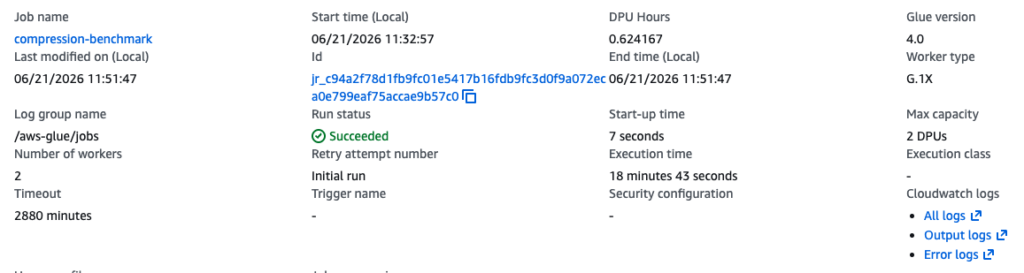
Here is the successful run:
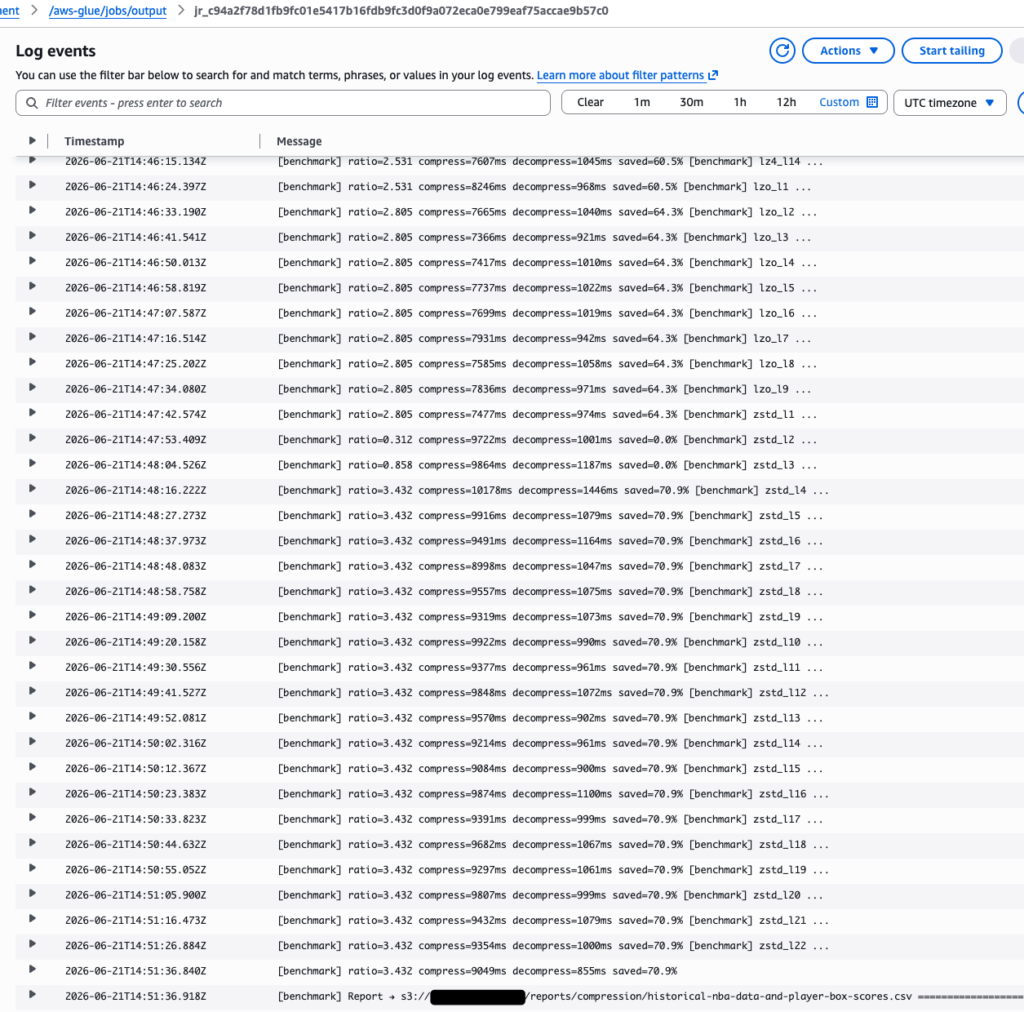
And here are some of the logs, it is possible to see each algorithm and level:
The raw results of the report are hosted here,
The Numbers

- Best compression ratio is
gzip-9(the last digit being the number of the level of the codec during compression/decompression) with 3.5185x (although other codecs and levels are quite similar) - Best compression is
lz4-7, with 250 mb/s - Best decompression is
zstd-22, with 2,077 mb/s - The compression process that costed the less while running in Glue is
lz4-7
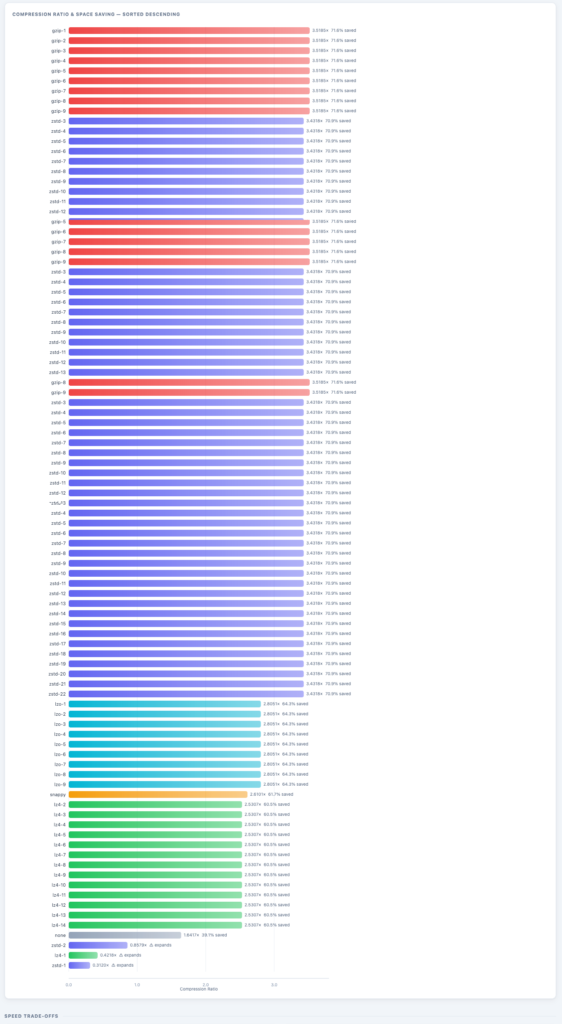
Here is a list of all compression ratio per codec/algo and level. Some insights that I can drive from this:
- If you use just any lower level, without thinking too much, you may end up with worst cases and bloated data like with
zstd-1orlz4-1 - There are some good plain options like
snappy- But you can do better if you go above the traditional and explore different levels with
zstdandgzip
- But you can do better if you go above the traditional and explore different levels with
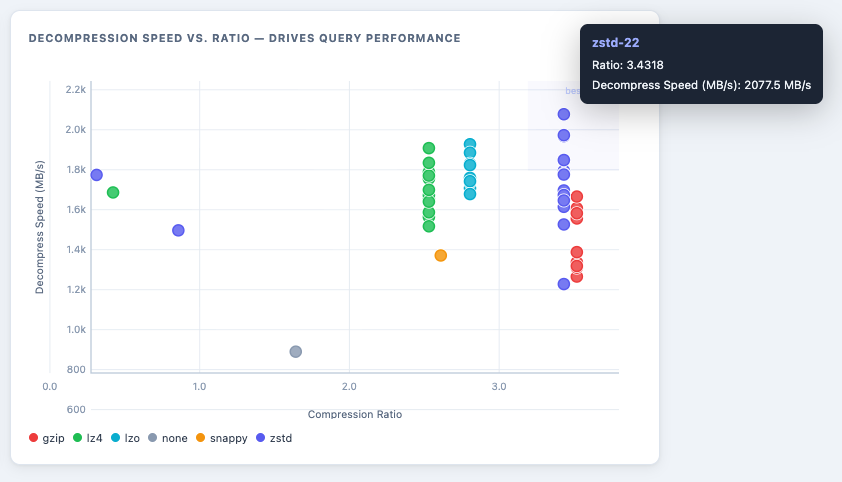
Now let’s compare decompression speed versus the compression ratio. The biggest one for both metrics is the ideal option for queries that will read and consume the data more than writing. As it is possible to see, the best ones will be zstd with higher levels, from 9 to above.
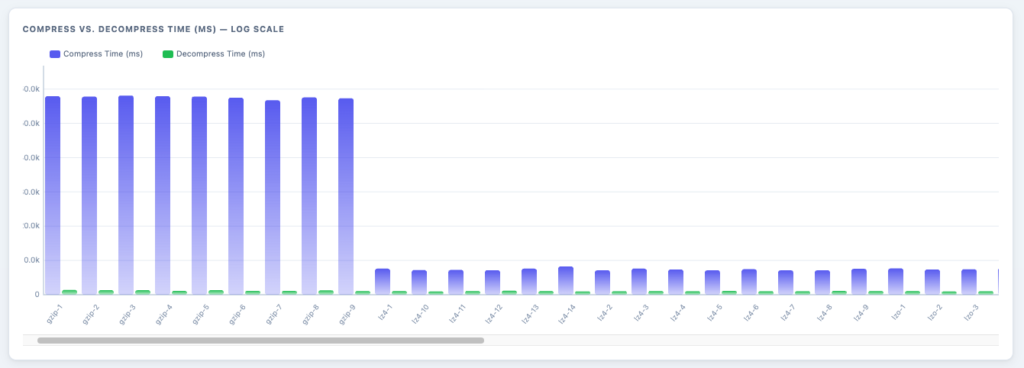
Not able to show all the algorithms and their compression/decompression time, but this is interesting to see that the compression time of each gzip level can take up to 6x more than any other algorithm/codec.
This is a good indication that, although gzip has a better compression ration, it may not be worth it since it would take more resources to run over with it.
Conclusion
Here are some insights I can draw from that experiment:
- New Architecture: When starting a new data solution, aim to explore different compression algorithms based on your use case and design.
- Data Lakes: My suggestion is to use
zstdat a level 3 or higher. You will have a performance that can be 6x faster than gzip and can lead to significant performance gains when reading the data, which is great for production consumption. - Ingestion focus: If you have a case where, for example, you need to receive the streaming of logs and storage/archive, consider to use
lz4with level 7 or above, since it is more important write-heavy scenario and that can support up to 250 MB/sec. - Compression Levels: There is a moment that more levels does not indicate significant improvements of reducing the file size.
- If you need extreme results (collect the “last drop” of performance), then explore the level of the codec.
- If you just need a good enough result, go to a mid level of each codec and you should be fine (from 3 to 7, but it can very per codec/algorithm).
- Don’t only consider compression ratio: Evaluate compression/decompression time since it can lead to more CPU/memory being consumed and a higher cost (depending on your infrastructure). For example,
gziphas the best compression ratio, but it can take up to 6x more of compress time compared with other algorithms. - Always check the support of each codec/algorithm for your application and platform: If you intend to run in a serverless option, like AWS Lambda or Glue, or in a specific programming language, does the current underlying infrastructure/solution already has a way to run and support it the algorithm/codec? If not, do you need to install a custom package/layer to support it? Is it worth it or better to go with a good enough option to simplify the solution?
References
To write this blog post, I used the following articles and books to guide the content:
- NBA Dataset: Box Scores and Stats (1947 – Today) — Kaggle, Eoin A. Moore.
- Choosing Between gzip, Brotli and zStandard Compression — Paul Calvano (2024).
- A Review of Data Compression Techniques — Fitriya, L.A. & Purboyo, Tito & Prasasti, Anggunmeka. (2017). A review of data compression techniques. International Journal of Applied Engineering Research. 12. 8956-8963.
- A Study of Various Data Compression Techniques — Ravi, Prakash G. and D. Ashokkumar. “A Study of Various Data Compression Techniques.” (2015).
- Ameliorating Data Compression and Query Performance Through Cracked Parquet — Hansert, Patrick & Michel, Sebastian. (2022). Ameliorating data compression and query performance through cracked Parquet. 1-7. 10.1145/3530050.3532923.